About this training
XR-based simulation-first curriculum with staged reality training for autistic learners beginning welding. Focus on predictable routines, safety behaviors, coordination, torch angles/speed, and bead quality. Uses one-change-at-a-time coaching, explicit tolerance bands, and shared wording/icons across sim → reality for transfer.
Audience: Instructors new to autistic learners; welding trainers moving to simulation-first delivery. No prior welding required for learners; basic computer familiarity helps.
Learning Outcomes- Understand Speed, Trajectory, Distance, and Angles indicators.
- Hold each parameter within beginner tolerances on a PB fillet root pass.
- Combine parameters to complete a short bead using visual + audio feedback.
Is it good for me?
Trainer Guidelines
Predictability · One change at a time · Brief, concrete feedback · Affirm → focus → affirm · Learner autonomy
This training approach emphasizes predictability, meaning learners know what to expect, which reduces anxiety and builds confidence. By making one change at a time, the learning process stays manageable and prevents overload. Trainers provide brief, concrete feedback, so learners immediately understand what went well and what needs adjustment. The affirm → focus → affirm cycle highlights strengths first, then addresses a specific improvement area, and closes again with encouragement. Finally, fostering learner autonomy allows participants to take ownership of their progress, increasing motivation and long-term skill development. Together, these principles create a supportive, structured, and empowering learning environment.
| Do | Don’t |
|---|---|
| Start on flatscreen; add AR/VR only after stable success. | Push immersive mode before basics are solid. |
| Use short, literal instructions + quick demos. | Overload with long verbal explanations. |
| Run ≤10-minute blocks with proactive breaks. | Run long, fatiguing blocks without rest. |
| Change one parameter at a time. | Alter multiple variables at once. |
| Define simple, measurable criteria and log progress. | Rely on vague impressions of progress. |
| Use specific praise + targeted correction. | Only point out errors or be generic. |
| Adapt sequence to the learner’s profile. | Force one-size-fits-all pacing. |
Curriculum (Phases 0–5)
Short, openable panels with one-screen summaries. Open to see details and trainer tips.
- Show visual schedule & set expectations.
- Motor warm-up: shoulders → forearms → wrists → fingers.
- Screen pencil drills (simple → harder). Transition to Wave NG when calm/accurate.
Introduce the simulator, then show the processes, and turn on beginner level and adjustable parameters.
- Speed — travel rate
- Trajectory — line following
- Distance — standoff
- Angles — work/travel angles
- Seat stylus in adjustable holder; relaxed grip; elbow support.
- Right/left-handed mode set; cable routed safely.
- Elbow is in the air. No fixed point.
First demonstrate the simulation process with a simple task such as GMAW bead 135. You should explain the objects and the colors on the simulator step by step. See the video below.
Watch the droplet; keep the small white sphere visible; follow the track (green = ok; red = too fast; yellow = slow limit). Introduce 111 MMAW (SMAW) later with the same logic. If needed increase tolerance treshold settings with VULCAN software to make completion easier.
After demonstration show the student how to set all the parameters. Beginner state, right or lef hand, processes, and the filters. See the video below.
Note: Steps 1–7 take multiple sessions. Advance only on consistent success.
Suggested progression to real welding
- Speed only: minimum 3 consecutive successful passes.
- Speed + Trajectory: minimum 3 consecutive successful passes.
- Speed + Distance: minimum 3 consecutive successful passes.
- Speed + Angles: minimum 3 consecutive successful passes.
- Three-parameter combinations: minimum 4 consecutive successful passes.
- All four parameters simultaneously: minimum 5 consecutive successful passes.
| Step | Active focus | Coaching cue | Success cue | Time scale |
|---|---|---|---|---|
| 1 | Speed only | “Smooth & steady; watch the bar.” | Speed in band | 2–5 sessions |
| 2 | Speed + Trajectory | “Follow the line; keep Step-1 speed.” | Line + speed | 2–5 sessions |
| 3 | Speed + Distance | “Coin-thick standoff.” | Distance + speed | 2–5 sessions |
| 4 | Speed + Angles | “Lock shoulder; hinge elbow.” | Angle + speed | 2–5 sessions |
| 5 | Speed + Trajectory + Distance | “Eyes: line → tip → line.” | All three in band | Several sessions |
| 6 | Speed + Trajectory + Angles | “Micro-adjust wrist.” | Three in band | Several sessions |
| 7 | All four | “Small moves; listen to the arc.” | Stable across all | Several sessions |
Step 1: speed only
Step 2: speed + trajectory
... Step 4: speed + angles
- Highlight two concrete successes + one focus for next time.
- Record in the Progress Log (Downloads).
- After two sessions with consecutive successes, narrow tolerance 10–20% for active parameter(s).
The numbers below are recommendations only. Consecutive successful passes indicate that the learner can perform the task safely, consistently, and with limited support before progressing to real welding equipment.
| Exercise | Suggested minimum consecutive passes |
|---|---|
| Phase 0 — Intro and warmup | 1 |
| Phase 1 — Introduce the simulation | 1 |
| Phase 2 — Device & Posture | 2 |
| Step 1 — Speed only | 3 |
| Step 2 — Speed + Trajectory | 3 |
| Step 3 — Speed + Distance | 3 |
| Step 4 — Speed + Angles | 3 |
| Step 5 — Speed + Trajectory + Distance | 4 |
| Step 6 — Speed + Trajectory + Angles | 4 |
| Step 7 — All four parameters | 5 |
| Phase 6 — Reflection & Next Step | 2 |
Pass rule: follow safety protocol; meet bead/parameter targets; tighten tolerances after consecutive successes.
Equipment & Software
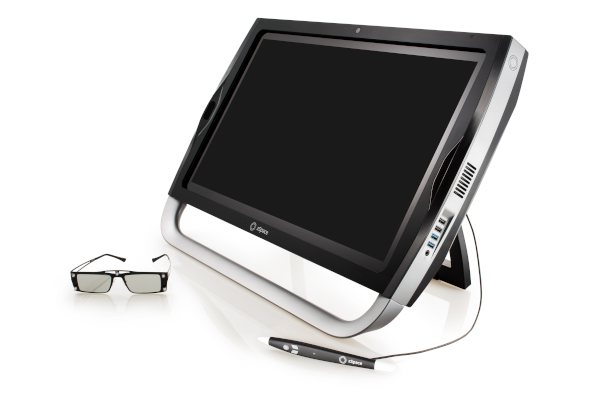
- Hardware: zSpace device with stylus; fixed & adjustable holders.
- Software: Wave NG virtual welding motion learning system; VULCAN scoring/tolerances.
- Audio: Headphones or speakers (arc sound stays ON).
Preparation Checklist
- Calm, well-lit environment; distractions minimized.
- Device positioned; stylus seated; handedness set.
- Adjustable holder by default; cable routed safely.
- Sound enabled and volume checked.
- VULCAN beginner tolerances set.
- Visual schedule displayed (steps + time).
- Break signal agreed (card/gesture/word).
Grading Guideline (Beginner → Advanced)
Dimensions: knowledge, procedures, technique quality, safety, efficiency, teamwork.
| Dimension | Beginner (Phases 0–2) | Intermediate (Phases 3–4) | Advanced (Phase 4–5) |
|---|---|---|---|
| Knowledge | Names UI/icons; PPE basics | Explains parameters; joint selection | Anticipates risks; optimizes settings |
| Procedures | Follows setup with guidance | Independent setup & prep | Adapts sequence for material/position |
| Technique | Basic beads; some corrections | Consistent beads; joints meet spec | Advanced control; low defect rate |
| Safety | Relies on trainer reminders | Consistent checks; no violations | Proactive, safe under time pressure |
| Efficiency | Slow; needs prompts | Balanced pace; minimal rework | Fast & precise; optimizes heat input |
| Teamwork | Responds to direct prompts | Communicates setup/inspection | Leads debrief; supports peers |
Progression should be based on repeatable control of speed, trajectory, distance, and angles rather than time spent in training. Stable motor control and sensory regulation are essential before introducing live welding equipment.
Reality Training — Integrated Transfer Design
Here are some ideas and strategies to follow when you switch to the real training environment.
- Safe, predictable environment: same wording/icons as in simulation.
- Simulation advantages: practice at own pace; consequence-free errors.
- Reality demands: gentle exposure to variation (noise, light, heat, people).
- Map competencies: simulation → blended → real.
- Readiness gate: consistent ≥80% accuracy in simulator on target routine → attempt equivalent real task.
- Sensory readiness: the learner remains calm and focused when exposed to welding sounds, PPE, light changes, and workshop routines.
- Feedback loop: compare sim vs real; tune sim (noise, variability) to address gaps.
- Stage 1 — Dry Runs (No power): PPE & workstation checks; posture; angles with a switched off stick or torch; line-follow on scrap.
- Stage 2 — Short Live Beads: PB fillet root coupons with sim tolerance bands; coach one parameter at a time; keep arc sound ON.
- Stage 3 — Tolerance Narrowing: after two successful sessions, tighten active tolerance 10–20%; introduce mild, planned variability.
- Stage 4 — Authentic Tasks: longer beads & simple joints; fixtures and timed micro-goals; compare sim metrics with real welds.
- Integrated: shared assessment system and micro-steps.
- Interactive: sensory profile informs sequence and environment.
- Complex: technical + social/emotional/adaptive skills develop together.
- Confident transition: learners step into real tasks safely and predictably.
- Flexibility: adaptability under modest, planned variability and unexpected events.
- Workplace readiness: sim-practiced skills transfer to job settings.
Pass rule (reality): No safety violations; bead width & waviness within beginner band; stable speed; narrow after two consecutive successful sessions.
Sensory & Emotional Supports
| Support | How to apply |
|---|---|
| Arc sound ON (adjustable) | Keep simulator arc audio enabled—it’s the key cue for speed and arc stability. Set a comfortable volume at the start and keep it consistent session-to-session. Headphones are fine if agreed with the learner. |
| Agreed break signal | Choose a simple word/gesture or break card and practice it. When used, pause immediately, offer a short reset, then resume with one clear micro-goal (e.g., “speed only to the next marker”). Log triggers to refine pacing. |
| Short, literal instructions | Use verb-first, concrete cues (“Slow by 10%,” “Keep tip on the line”), demo once, allow processing time. Change only one variable per attempt; if performance dips, revert to the last stable setting. |
| Specific positive reinforcement | Name the exact behavior and its effect (“Your standoff stayed steady, so bead width was consistent”). Aim for 2 affirmations per correction and pair praise with the next step. Track wins on a visible progress chart. |